Showing posts with label Mobile Zone. Show all posts

Friday, October 14, 2011

New Nokia Symbian Belle Anounced


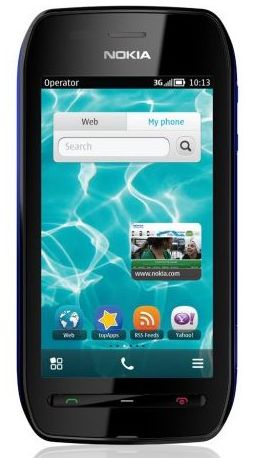
Nokia today announced the Nokia 603, a colorful, affordable, no compromise Symbian Belle smartphone preloaded with the latest apps and featuring single-tap pairing, sharing and tag reading with NFC.
Powered by a 1GHz processor, the Nokia 603 is responsive even while multitasking many apps, but this power doesn’t mean you have to worry about your battery all the time. It’s rated to last for seven hours talktime and 460 hours in standby, considerably longer than other phones with this sort of feature set.

Sunday, October 9, 2011

New Nokia Symbian Belle

symbian-belle banner
Various sources have confirmed that Nokia will be rolling out the next Symbian update called Belle for all S^3 devices at the end of this month. Earlier it was said that the update will reach consumers by the end of this year, but Nokia has surely pulled up its socks. 

Sunday, July 17, 2011

Sony Ericsson Xperia Active is truly water-proof


Sony-Ericsson-Xperia-Active-Specs
Sony Ericsson had recently announced a smartphone for people who are active, mostly sports oriented. The Xperia Active has a nice sporty look and the best part, it is water-proof. The handset will be a the first of a kind Android smartphone that can take on water and dust and the touch-screen has the ability to respond to wet fingers.
But companies claim a lot these days and their proclamations remain limited to their words only. So is it same with the Active ? Well, Sony Ericsson is faithful on this one. 

Here is a video by Se-First showing the Active submerged completely in a lake. Sony Ericsson claims that the phone can handle 30 minutes under water up to 1m without any damage.

Saturday, July 16, 2011

Android based Optimus Pro and Optimus Net enters LG Optimus family

LG-Optimus-Net-Optimus-Pro
LG today announced expanded its Optimus family of smartphones by introducing two newAndoroid 2.3 (Gingerbread) based smartphones - The touch and QWERTY device, LG Optimus Pro (LG-C660) and the touchscreen phone, LG Optimus Net (LG-P690).


Optimus-Pro

LG Optimus Pro - QWERTY and Touch
The first LG Optimus smartphone with a portrait bar QWERTY keyboard.The 2.8-inch display provides quick navigation while the QWERTY keyboard is ergonomically designed for fast and accurate typing. It has dedicated hotkeys for email and scheduler. Optimus Pro will be available in white, titan, as well as black. Optimus Pro boasts largest 1500mAh battery in its class and is packed with a 800 MHz CPU.

Optimus-Net

LG Optimus Net
Featuring LG Social+, the Optimus Net combines the most popular social networking portals in one convenient widget right on the homescreen. With a single click, users can multitask between updating their status on Facebook and Twitter while reading their friends’ social media feeds on the same screen. The integrated social widget provides one-click photo sharing with multiple social media accounts from the home screen. The phone comes with the LG SmartShare function allows easy sharing of content with other DLNA-friendly devices, 3.2 HVGA (320 x 480) display, 1500mAh batteryand  a 800 MHz CPU. FYI, LG will ship Dual SIM models of this device in India, so It will be a dual SIM Android based device.

Specifications for the Optimus Net will vary market by market. Depending on the carrier, some of the phones in Europe will be Near Field Communication (NFC) capable for mobile payments. The North American version will include a QWERTY keyboard and in Brazil, China, Asia and the CIS region, the Optimus Net will be dual SIM-compatible. 

The two smartphones will be available starting this summer, rolling out in 30 markets beginning in Europe. The phone will be available in white, as well as black.

Thursday, July 7, 2011

Samsung coming up with a WP7 version of the Galaxy S II


samsung-wp7-rumor
After creating a furor in the Android world with the Samsung Galaxy S2 - it seems Samsung wants to use the same form factor to another platform. Rumor has it that Samsung are working on a top end, power packed phone which shall be running the latest edition of Microsoft WP7.
 
The suspicion comes from a Bluetooth SIG certificate, issued to Samsung i937. Seeing the profile of the smartphone it's obvious that it’s a WP7 device besides the name has already surfaced through occasional Gamers list of Windows Phone 7 handsets.

The move to Windows Phone would also require the Galaxy S II chipset to be replaced with a Qualcomm Snapdragon, but those are quite capable too so it's no big deal. 

This is certainly exciting news, the power packed hardware with the more refined Mango edition of WP7 shall certainly give some competition to Android and iOS.

Official Press Shots of the Nokia Zeta '700'


nokia-700-zeta
Nokia 700 also known as Zeta, a leaked handset by Nokia is now out in the open giving its first official shots for the press.  However there is no official spec list or any other detail of the device.
 
By the looks of the images and earlier leaked specs, the device will have a 3.2 inch AMOLED capacitive touch screen, a 1GHz processor, a large speaker grill at the bottom, a 5MP camera a front camera, NFC, and probably a new update of the Symbian Anna platform called Belle. 

Nokia is finally getting into the game and launching handsets with 1GHz processors. New Symbian devices with 1GHz processors, including the Zeta, are said to be official by September, which means that Symbian Belle will be out at the same time. And what about Windows Phone then ? How will Nokia market both Windows and Symbian handsets side by side ?

Do share your views.

LG Optimus Black now available in India

LG OPTIMUS BLACK PRICE IN INDIA
LG has officially announced the availability of one more smartphone in Optimus Series - Optimus Black (P970) in India, LG announced the launch in April but made the handsets available recently. 


The Sleek and elegantly designed phone comes with a 4-inch multi-touch NOVA Display IPS LCD Screen. LG’s ultra bright NOVA Display designed to be the brightest, clearest and most readable among mobile screens, achieves a world-best brightness of 700-nits, and offers the best screen visibility even under bright sunlight. In addition to enhanced luminosity, the NOVA Display on LG Optimus Black also radically reduces power consumption by 50 percent during general indoor use compared to a conventional LCD.

Priced at Rs 20,990, it comes with LG Optimus UI 2.0, which is designed to provide enhanced graphics experience, easy customization and a 7-way home screen personalization. The Optimus UI 2.0 allows you to directly access messages, emails and missed calls from the locked screen with just a single finger tap. The Gesture UI with the G-Key offers easy and intuitive commands, including lifting, shaking and tapping, for taking calls, using the camera, or enjoying music.

LG Optimus Black Specifications
Network – HSDPA 7.2Mbps / HSUPA 5.6Mbps
Processor - 1GHz TI OMAP3
Chipset – OMAP 3630 (1Ghz  Processor)
Dimension – 122 x 64 x 6 ~ 9.2 mm (109g)
Display – 4.0” WVGA IPS LCD
Camera – 5M AF camera,  World’s 1st 2MP front-facing camera
Memory – 2GB eMMC / 512MB RAM
OS version – Android 2.2 Froyo
Wi-Fi /A-GPS – 802.11.b/g/n
Battery – 1500mAh
Others – Gesture UI, DLNA, Dolby Mobile, LG World

iPad 2 Review: Hands on with Apple's Next Generation Tablet

ipad-2-review-1

An year after the iPad, Apple launched the iPad 2. Faster, thinner, lighter. The original iPad created an all new tablet industry which was subsequently entered into by various Android manufacturers, some with better specs but not necessarily better experience.

Apple’s aim has always been to make the word ‘iPad’ synonymous with ‘tablet’. Does Apple succeed in this objective with the iPad 2? We find out.

Specs, Look & Feel
The iPad 2 brings both a performance upgrade and a redesign. The tablet is powered by Apple’s A5 SoC with a dual core 1GHz ARM Cortex A9 processor, PoverVR SGX543MP2 graphics and 512MB RAM. The screen is the same 9.7 inch LED IPS display that we have seen on the original iPad

Needless to say, as advertised, the iPad is thinner & lighter than its predecessor. But it looks very much like the original iPad. The position of the iPad’s buttons and ports are more or less retained too. There’s a sleep/ wake button at the top right, a standard headphone jack at top left, a volume rocker and a sliding switch that is configurable to lock screen orientation or mute alert sounds at the top of the right side, a 30-pin dock connector port at the bottom, & a home button at the bottom of the front face.

Cameras and FaceTime
The cameras were sorely missed in the original iPad but the iPad 2 finally gets a camera. In fact, two of them. The front facing is for FaceTime while the rear camera is for taking snaps. The FaceTime experience is very good though we would like it to be supported over 3G too in the future. The rear camera isn’t that impressive for taking pics but you wouldn’t want to be seen taking party pics with a ~10 inch tablet anyways! And it can record 720p videos for the records!

Apps

The iPad like most Apple products is all about apps. And the app that really stands out from the crowd is Flipboard which converts various data sources such as Facebook, Twitter, Google Reader & Flickr to a magazine format. The animation used to display flipping of pages is superb & gives you the impression of browsing through pages. This is the app that truly justifies the very existence of an iPad. If we were ever told that we could use the iPad with just one app, that app would be Flipboard without any second thoughts!


ipad-2-review-10

It has never been more fun to read your Facebook newsfeed than through Flipboard

ipad-2-review-2

ipad-2-review-3

Reading your Twitter timeline is fun too!

ipad-2-review-twitter

And Google Reader news doesn’t feel boring anymore

ipad-2-review-4
Moving on with other apps, Twitter for iPad is very polished & has push notifications that iOS fans are now quite used to

ipad-2-review-12

Garageband converts the iPad into a musical instrument and allows you to produce songs in a fun way

ipad-2-review-5

Like in the original iPad, Apple’s suite of paid iWork apps, Keynote, Numbers, & Pages are available on iPad 2. All 3 apps come with sufficient number of templates to create documents on the move

ipad-2-review-13

You can watch live TV on your iPad

ipad-2-review-6

And who needs to buy newspapers when you can read them this big! (Note the ‘iPad Edition’ on top. Cool!)

ipad-2-review-14

Unfortunately Facebook for iPad is not available. So you have to make do with the iPhone app for now. However an iPad version is expected soon. One thing to note here is that if an iPhone app is not available for iPad then your only choice is to use an upscaled version of the iPhone app on iPad which doesn’t look that nice. See for yourself

ipad-2-review-7

ipad-2-review-8

Browsing, Email & IM
You don’t need a laptop to browse websites anymore when you have the iPad 2. Unless you need Flash of course. You can bid goodbye to browsing mobile versions of websites while on the move.

ipad-2-review-15

Email on the iPad is well taken care of by the built-in email app while Instant Messaging is taken care of by apps such as imo.im

Gaming
Apple has emphasised graphics performance on iPad 2 and also introduced a gyroscope for 3-axis positioning. It’s safe to say they are taking gaming very seriously. The abundance of games found in the App Store ensures that gaming on the iPad 2 is a pleasure. Many developers have already updated their games to take advantage of the better processing and graphics on iPad 2

Movies
Watching movies on the iPad can be fun except for the fact that the iPad has an 4:3 aspect ratio which is not ideal for most movies. Moreover, out of the box Apple only allows you to use regular MOV & MPEG movies to be watched in its movie player. To watch DivX movies, you may need to install free apps such as OPlayer HD or purchase paid apps such as AVPlayer since the ubiquitous VLC Player has been long removed from the App Store due to legal issues. We unfortunately could not test our DivX movies on the iPad 2. 

Text Input

Can a tablet be a notebook replacement? In most cases, it can’t. But just in case you want to use it as one, the crucial aspect is how fast & efficient the input system is. We tried typing fast on the iPad with 2 hands as we would do on the physical keys of a laptop. Surprisingly we could type quite fast on the touchscreen qwerty & the auto-correct system in action meant that we didn’t need to correct our spellings many times. We were more than happy with the typing experience on iPad 2.

ipad-2-review-9

Battery Life
Despite boosts in processing power, iPad 2 retains the same ten-hour battery life as in the original iPad. In nearly a week of use, we never felt let down by the battery. 
Smart accessories

Smart accessories
With the release of the iPad 2, Apple is also releasing several accessories related to the iPad 2. Most notable is the Smart Cover that magnetically sticks itself to the side of the iPad 2 and protects the front, locking and unlocking the iPad when you open and close the cover. You couldn’t put on the Smart Cover wrongly even if you wanted to! Pretty neat!


ipad-2-review-16

The Apple Digital AV Adapter gives the iPad 2 the ability to output HD video and mirror its own screen. This can be quite useful in giving you a better experience in watching movies & gaming.

Should you buy or upgrade?
In terms of use cases, the iPad 2 can be used for web browsing, gaming, reading eBooks & newspapers, watching movies, etc. We must mention here that reading any stuff feels great on the iPad. Be it newspapers, eBooks or just your Facebook newsfeed through Flipboard. 

The list of disadvantages of any iOS device is the usual long read. Apple’s iOS has limitations that we all are forced to live with. Apple will never introduce Flash support, allow regular file management or make iTunes optional. The lack of a USB drive on any tablet can be a big disadvantage & the iPad 2 is no exception.

Though the iPad 2 is an improvement on the original iPad in numerous ways, it’s still an evolutionary product & not a revolutionary one. If you are happy with your original iPad, there is no reason to dump it just because there is a newer version available in the market. Besides the speed improvements, the only other reason for you to upgrade is its camera for FaceTime. The iPad 2 even retains the same display resolution as the original one.

Of course, if you need to buy a new tablet, then iPad 2 should definitely be on top of your list. In India, budget permitting, we would anyday suggest buying a Wi-FI plus 3G model over a pure Wi-Fi one simply because Wi-Fi hotspots are not as abundant in India as they are in other countries. Moreover, only the Wi-Fi plus 3G models have a GPS chip which can be an added advantage!
Copyright © 2011-2012 Muhaimen. All rights reserved